Google Ad Grants for Australian charities: The complete guide (2026)

Google Ad Grants is one of the most underutilised tools available to Australian charities.
Eligible organisations can access up to USD $10,000 per month in free Google Search advertising, yet many not-for-profits either don’t know about the grant, don’t consistently meet the requirements, or struggle to spend their available budget and connect it to meaningful outcomes.
Many charities use Google Ad Grants primarily to promote their organisation name and fundraising campaigns in Google Search.
While these activities are important, Search can also help charities build awareness, attract volunteers, grow email subscribers, promote events and educate the community about important issues.
In this guide, we’ll explain how Google Ad Grants works and the practical strategies that can help charities get more value from the program.
Contents
TL;DR: What you need to know
Eligible charities can access up to USD $10,000 (approximately AUD $14,000) per month in free Google Search advertising.
To keep the grant, you’ll need to maintain compliance requirements including minimum click-through rates (CTR), conversion tracking and regular account management.
The strongest accounts use Google Ad Grants to build awareness, recruit volunteers, grow email subscribers and promote educational content.
Success comes from relevant keywords, relevant ads, relevant landing pages and ongoing optimisation.
Bottom line: Google Ad Grants isn’t just a fundraising tool. It’s a powerful way to increase awareness, grow supporters and generate donations.
What is the Google Ad Grants program?
Google Ad Grants is a program offered through Google for nonprofits that provides eligible charities with up to USD$10,000 (approximately AUD $14,000 per month, depending on exchange rates) per month in free Google Search advertising.
The grant allows charities to appear in Google results when people search for topics related to their mission, programs, services or fundraising activities.
Unlike traditional Google Ads campaigns that can use features such as Display Network and Performance Max, Google Ad Grants can only be used on Google Search and must comply with a range of eligibility and account management requirements.
To access Google Ad Grants, organisations must:
be a registered and eligible charity
enrol in Google for Nonprofits
have a secure website with meaningful content.
While the eligibility requirements are relatively straightforward, ongoing success with Google Ad Grants depends on campaign strategy, keyword selection, ad relevance and ongoing optimisation.
Google Ad Grants requirements and compliance
Google Ad Grants is designed to help charities reach more people through Google Search. To keep your account active, you'll need to meet Google's ongoing program requirements.
The most important requirements include:
- maintaining a minimum 5% account-wide click-through rate (CTR) each month
- configuring and tracking at least one meaningful conversion action
- having at least two ad groups (ads + keywords) per campaign
- having at least two sitelinks pointing to relevant content on your website
- using conversion-based Smart Bidding in each campaign
- using relevant, mission-related keywords
- not using single-word keywords (except for approved exceptions such as recognised brands, medical conditions and other Google-approved terms)
- avoiding overly generic keywords that aren't closely related to your organisation, services or cause
- maintaining a secure, high-quality website that complies with Google Ad Grants policies
- responding to Google's annual program survey.
While these requirements may sound technical, they largely align with good digital marketing practice. Relevant ads, useful landing pages, meaningful conversion tracking and regular optimisation will help both compliance and campaign performance.
Good to know: The 5% CTR requirement applies across your entire Google Ad Grants account each month, not to individual campaigns or ads.
The 4 Google Ad Grants campaign types every charity should run
The Google Ad Grants allowance is a ‘use it or lose it’ arrangement; unspent funds do not roll over into the next month, so it’s worth investigating how best to maximise the available budget. One of the biggest reasons charities struggle to spend their monthly funding allowance is that they focus on too few campaign types.
It is common for organisations to set up a handful of donation-related keywords, and hope that people searching for these keywords will convert. The problem is that donation searches represent only a small part of the supporter journey.
People often spend weeks, months or even years learning about a cause before making a donation. Some may never donate, but instead volunteer, attend an event, advocate for change or help spread awareness.
That’s why we recommend building a mix of campaign types that support different stages of the journey.

Image: 4 best-practice Google Ad Grants campaign types
1. Brand campaigns
Brand campaigns target searches for your organisation, programs and services, for people looking directly for you. These users might be actively exploring making a donation, or might be existing supporters.
These campaigns target search terms for the name of your specific brand, for example:
Australian Animal Protection Society
Make-A-Wish Australia
Beyond Blue
Cancer Council
Brand campaigns are often overlooked because organisations assume they’ll rank organically anyway. However, brand campaigns allow you to control the message people see, to direct traffic to priority pages and to protect your search presence from competing advertisers.
They’re also typically among the highest-performing campaigns in a Google Ad Grants account to help you meet your 5% click-through rate goal.
2. Fundraising campaigns
Charity fundraising campaigns are a focus of what drives donation and success. However there is an additional opportunity in ‘always on’ search advertising. While you can customise search ads for specific appeal campaigns, you can also have ads running all the time to drive incremental donations year round.
Examples search keywords might include:
‘donate to animal charity’
‘children’s charity donations’
‘suicide prevention charities’
‘cancer charity Australia’.
Ads targeting these kinds of searches capture strong intent and can generate valuable donation traffic.
The challenge is that search volumes are usually limited. Even the largest charities are unlikely to spend their entire Google Ad Grant budget through fundraising keywords alone.
That’s why it’s important not to rely exclusively on donation campaigns.
3. Cause awareness campaigns
People search Google every day to learn more about issues affecting their communities, families and workplaces. Organisations drive greater online donations when they’ve spent more time growing potential donors through brand awareness and engagement. This means you should consider creating search ads for the topics around your cause that people are searching to learn more about.
For example:
‘How many pets are in the pound?’
‘Effects of happiness on children’s health’
‘Mental health resources’
‘What types of cancer need more research?’
These searches may not generate an immediate donation, but they can introduce new audiences to your organisation and create opportunities for future engagement.
For many charities, awareness campaigns are one of the biggest untapped opportunities within Google Ad Grants.
4. Educational content campaigns
Not every visitor is ready to donate today. Ad Grants can be a first step to helping someone learn more about a cause or join your community.
A good way to maximise Ad Grants funding is to create educational content campaigns promoting resources and downloads such as:
guides
research reports
checklists
webinars
events
resource hubs.
For example, a charity supporting vulnerable pet owners might create a guide on accessing housing support that can accommodate pets. An environmental organisation might promote a report on local conservation efforts.
These campaigns can help grow your email database, increase engagement and create future fundraising opportunities.
More importantly, they recognise that support rarely happens in a single click. The strongest Google Ad Grants strategies focus on building relationships over time, not just generating immediate donations.
How to set up and optimise your Google Ad Grants campaign keywords
Well-structured campaigns make it easier to show relevant ads, attract qualified visitors and improve conversion rates. Google’s own guidance recommends building tightly themed campaigns that align closely with your ads and landing pages.
Group keywords by theme
Organise campaigns around a specific objective and group similar keywords together in collections of approximately 10–15 phrases. Avoid creating large ad groups containing dozens of unrelated keywords.
Note: To encourage more relevant keyword targeting with specific intent, Google doesn’t allow single-word keywords for Ad Grants. So always include 2 or more keywords per phrase.
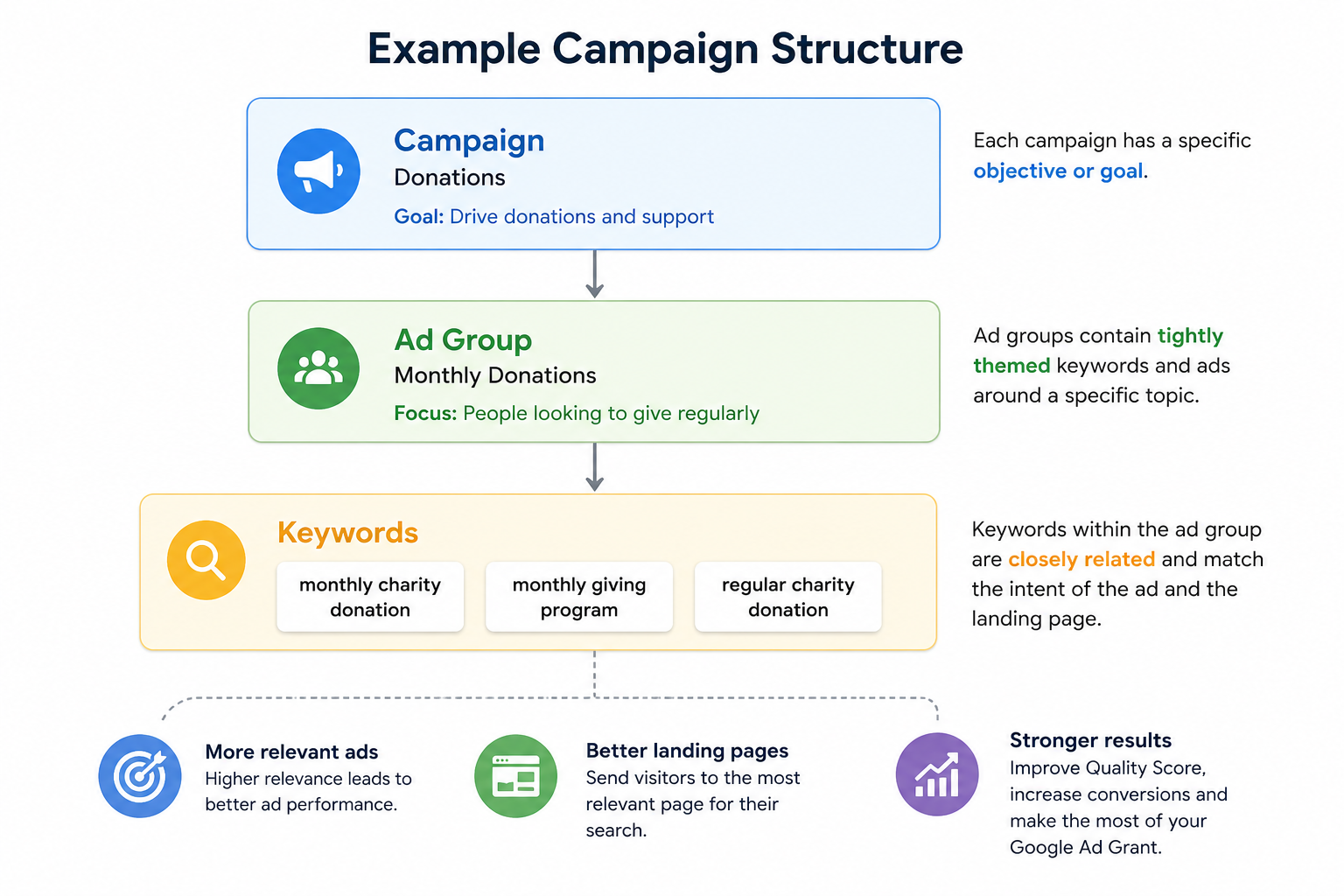
Image: Recommended Google Ad Grants SEM campaign structure
For example, a campaign to increase regular monthly donations might have the following setup.
Campaign: Donations
Ad group: Monthly monations
Keywords:
monthly charity donation
monthly giving program
regular charity donation
This structure makes it easier to create relevant ads and direct visitors to the most appropriate landing page.
Set your keyword targeting approach

Image: Keyword match types explained for your Google Ad Grants search campaigns
Google Search has a number of ways it matches keywords to people’s search queries for the greatest impact in different circumstances. When setting up Google SEM ads, you have three targeting strategies:
broad match
phrase match
exact match.
Start with a ‘broad match’ strategy to learn
When launching a new campaign, ‘broad match’ keyword targeting setup can help uncover how people are searching for your cause, services or programs.
Broad match targets searches beyond your keywords that might use one of your words in a phrase with others in a new context. It helps you find additional search terms, but will also find irrelevant search.
For example, the keyword phrase ‘homeless charity’ might result in a broad match, and subsequent ad trigger, when people search for ‘charity for people sleeping rough’.
This discovery phase can reveal:
new keyword opportunities
common questions
search terms you may not have considered
irrelevant searches that should be excluded.
Many charities initially use ‘broad match’ to discover new search terms, and then adjust their campaigns to use ‘phrase match’ and ‘exact match’ keywords. This strategy avoids spending too much money on irrelevant ‘broad’ keywords and helps to refine the audience down to a smaller number of people, who are more likely to take action.
We’ll now look at how to bring learnings into a more targeted approach, once you’ve run initial broad match search ads.
Refine campaigns to ‘phrase match’ and ‘exact match’
Once you’ve identified high-performing keywords, it is time to move them into ‘phrase match’ or ‘exact match’ campaigns, where you have greater control over when your ads appear.
This strategy often improves:
relevance
click-through rates
traffic quality
conversion rates.
Phrase match targets searches that include the exact meaning or sequence of your keyword, plus any additional words before, after or occasionally in between.
The example “homelessness charity” keyword phrase (enclosed in double quote marks in your account) might trigger your ads when people search ‘donate to homelessness charity’.
Exact match is the most specific and restrictive targeting option. It only triggers when a user’s search query has the exact same meaning or intent as your keyword.
The example here would be [homelessness charity] in your account, which would trigger your ads when people search the exact phrase ‘homelessness charity’.
In most instances we recommend phrase match as the best option, as this allows users who search your phrase, with other words before or after it, to still see your ad.
Use negative keywords generously
Negative keywords stop your ads appearing for searches that aren’t relevant to your organisation.
For example, a pet adoption charity may exclude searches related to breeders, pet shops or free animals.
Regularly reviewing search terms and adding negative keywords is one of the simplest ways to improve account performance.
Focus on search intent
Not every searcher is looking for the same thing.
Someone searching:
‘Donate to animal charity’
is likely much closer to taking action than someone searching:
‘Why are pets surrendered?’
Both searches can be valuable, but they should be treated differently. The first search should trigger a donation ad, and the second should trigger an ad for content related to the problem.
Matching campaign objectives, ad copy and landing pages to search intent will usually produce stronger results than sending everyone to the same page.
Review and refine regularly
Search behaviour changes over time.
New issues emerge. Language evolves. Community priorities shift.
The strongest Google Ad Grants accounts treat optimisation as an ongoing process, rather than a one-off setup task.
Above all else, when managing Google Ad Grants, think relevance.
Is each keyword group on one specific topic, with an average of 10–15 related keywords?
Is the text in each search ad relevant to the keywords in the related group?
Does the text in each ad clarify your intent or anticipated action?
Google’s goal is to show useful ads to users. The more relevant your keywords, ads and landing pages are to a searcher’s intent, the more likely your campaigns are to perform well.
Google Ad Grants best practices
There are a number of key best-practice actions you can take to ensure your account remains compliant, your campaigns make the most of your Google Ad Grants allowance each month, and you maximise your organisation’s impact.
Best practice 1: Responsive Search Ads
Responsive Search Ads (RSAs) are the default setting for Google Ads, allowing advertisers to provide multiple headlines and descriptions that Google can test and combine automatically.
Rather than writing a single ad, your campaigns should provide a variety of headlines and description options that highlight different aspects of your organisation, programs or offer.
For example, a single fundraising campaign could include headlines focused on:
the cause
the impact of donations
the urgency of support
trust and credibility
a clear call to action.
Over time, Google will identify which combinations of headlines and descriptions perform best for different searches.
Best practice 2: Write ads that match search intent
The best-performing ads reflect what the user is searching for.
Someone looking to donate may respond well to impact-focused messaging and donation calls to action.
Someone researching an issue may be looking for information, support services or educational content.
The closer your ad matches the searcher’s intent, the more likely they are to click and engage.
In practice, this means ensuring your ad groups for each campaign are on one central search topic, and your ad copy matches the search keywords. This ensures your ads are designed to trigger when they match closely with what a user is intending to find.
Image: Shows that with Dynamic Keyword Insertion, one ad can be customised and targeted based on the user’s actual search term.
Best practice 3: Consider Dynamic Keyword Insertion (advanced)
Dynamic Keyword Insertion (DKI) allows Google to automatically insert the user’s search term into your ad headline, when appropriate. The example image shows how this feature might function if you were wanting to capture people searching for volunteer opportunities.
When used carefully, this can improve ad relevance and help searchers quickly identify that your ad relates to their query.
However, DKI works best in tightly themed campaigns where keywords are closely related. In broader campaigns, it can sometimes create awkward or unclear messaging, as in the third headline shown, ‘Join Our Volunteer With a Charity’.
For most charities, strong campaign structure and relevant ad copy will have a greater impact than relying heavily on automation.
Best practice 4: Create landing pages that support conversion
Even the best ad can’t compensate for a poor landing page.
When someone clicks your ad, they should arrive on a page that closely matches the promise made in the ad.
For example:
donation ads should link directly to donation pages
volunteer ads should link directly to volunteer information
educational campaigns should link to the relevant resource or guide.
Sending all traffic to your homepage often creates unnecessary friction and can reduce conversion rates. Having at least 2 sitelinks set up in your account is also a compliance requirement of the Ad Grants program.
Best practice 5: Track meaningful conversions
Google requires Ad Grants accounts to track meaningful conversions, using tags and events in Google Analytics, to connect specific actions to ad clicks.
More importantly, conversion tracking helps you understand whether your campaigns are creating value.
Depending on your goals, conversions might include:
donations
volunteer registrations
event registrations
guide downloads
newsletter subscriptions
contact form submissions
Without conversion tracking, it’s difficult to know which campaigns are performing well and where improvements are needed. Conversion tracking also helps maintain Google Ad Grants compliance, because it is linked to the conversion-related Smart Bidding strategies that must be used within all Ad Grants campaigns.
Best practice 6: Review and optimise regularly
Successful Google Ad Grants accounts aren’t set up once and then left alone. We recommendlogging in to your account at least every 30 days, and making changes at least every 90 days. As mentioned earlier in this guide, you also need to maintain a click-through rate of 5% on average across your account.
Regular reviews can help identify:
new keyword opportunities
irrelevant searches
underperforming ads
landing page improvements
conversion opportunities.
Even small improvements made consistently over time can have a significant impact on campaign performance.
Common mistakes in Google Ad Grants management
Conclusion
Google Ad Grants is often described as free advertising for charities. While that’s technically true, the real opportunity is much bigger.
The organisations that get the most value from Google Ad Grants use it to connect with supporters throughout their journey, from awareness and education through to volunteering, advocacy and fundraising.
By building a mix of campaign types, creating tightly themed keyword groups and continually refining performance, charities can turn Google Search into a valuable channel for long-term growth and impact.
Like any marketing channel, success comes from understanding your audience, meeting them with relevant content and making it easy for them to take the next step.
Whether that’s downloading a guide, registering for an event, volunteering their time or making a donation, Google Ad Grants can help charities reach the right people at the right moment.
If your organisation already has Google Ad Grants, or you’re considering applying, now is a great time to review how search fits into your broader supporter acquisition and fundraising strategy.
Frequently asked questions (FAQs)
-
Eligible charities can receive up to USD $10,000 per month in free Google Search advertising through the Google Ad Grants program.
-
Most registered Australian charities can apply through Google for Nonprofits, provided they meet Google’s eligibility requirements and maintain a compliant website.
-
Yes. Many charities use Google Ad Grants to promote donation campaigns, regular giving programs and fundraising appeals. However, the most effective accounts typically include awareness, volunteer and educational campaigns as well.
-
Common reasons include limited search demand, overly restrictive keyword targeting, poor campaign structure, weak landing pages and a lack of ongoing optimisation.
-
Yes. Many organisations use Google Ad Grants to support awareness and supporter acquisition while using paid Google Ads campaigns for additional reach, fundraising appeals or highly competitive keywords.